Loading page…
Pitch
Description
Comments
Project details
Tagger is a zero dependency, vanilla JavaScript tag editor inspired by the StackOverflow tag editor. It provides an easy way to manage tags in input fields, allowing for seamless integration in web applications, including React. Simple to install and use, Tagger streamlines the tag creation process without the need for heavy libraries.
Tagger: Zero Dependency, Vanilla JavaScript Tag Editor
Tagger is a lightweight and efficient tag editor implemented in vanilla JavaScript, designed without external dependencies for ease of integration. This project draws inspiration from the tag editor used by StackOverflow, intended for use in a similar Q&A website that never came to fruition.
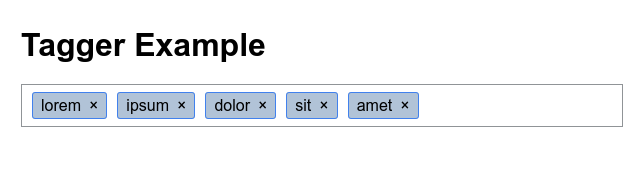
To utilize Tagger in a project:
tagger(document.querySelector('[name="tags"]'), {allow_spaces: false});
Tagger can be integrated into a React application easily:
import { useRef, useState, useEffect } from 'react';
import tagger from '@jcubic/tagger';

const App = () => {
    const [tags, setTags] = useState([]);
    const inputRef = useRef(null);

    useEffect(() => {
        const taggerOptions = { allow_spaces: true };
        tagger(inputRef.current, taggerOptions);
        onChange();
    }, [inputRef]);

    const onChange = () => {
        setTags(tags_array(inputRef.current.value));
    };

    return (
        <div className="app">
            <input type="text" ref={inputRef} onChange={onChange} defaultValue="charles, louis, michel" />
            <br/>
            <ul>
                {tags.map((tag, index) => <li key={`${tag}-${index}`}>{tag}</li>)}
            </ul>
        </div>
    );
};

function tags_array(str) {
    return str.split(/\s*,\s*/).filter(Boolean);
}

export default App;
Explore a live demo on CodePen.
Methods:
add_tag(string): booleanremove_tag(string): booleancomplete(string): voidOptions:
wrap: Allows tags to wrap onto new lines (default: false)allow_duplicates: Enable duplicate tags (default: false)allow_spaces: Allow spaces in tags (default: true)completion: Configuration for tag suggestionsFor a comprehensive overview, consider reviewing the TypeScript definition file: tagger.d.ts.
Tagger has been highlighted in various publications including:
Tagger offers a simple yet powerful solution for incorporating tagging functionality into web applications.
Comments
0Start the conversation
Share the first comment.