Loading page…
Pitch
Description
Comments
Real-time tracking of Claude.ai usage on Windows.
Project details
Claude Usage Widget is a sleek desktop application for Windows that provides real-time tracking of your Claude.ai usage statistics. Featuring visual progress bars, countdown timers, and a secure environment, this widget integrates seamlessly into your workflow while keeping you informed of your usage metrics.
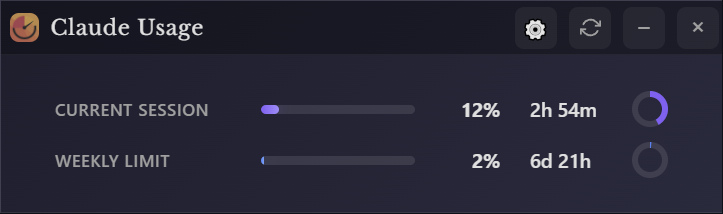
Claude Usage Widget is a small, standalone Windows desktop app built to solve a simple problem: seeing how much Claude.ai usage you have left, in real time. The widget runs entirely locally, with no telemetry and no data sent anywhere except Claude.ai.
After downloading the latest release from the Releases, the installation process is straightforward. Upon launching the widget for the first time, users can log into their Claude.ai account to start viewing their usage statistics.
The widget prioritizes user security, ensuring all session credentials are stored locally and securely, with no information sent to third-party servers. It communicates solely with the official Claude.ai API for usage data.
Planned future enhancements include support for macOS and Linux, customizable themes, alert notifications, and more, ensuring continual improvement based on user feedback.
For any issues, users are encouraged to check the Issues page for troubleshooting guidance or create a new issue detailing their challenges. Contributions are welcomed through pull requests to enhance the widget further.
Comments
0Start the conversation
Share the first comment.