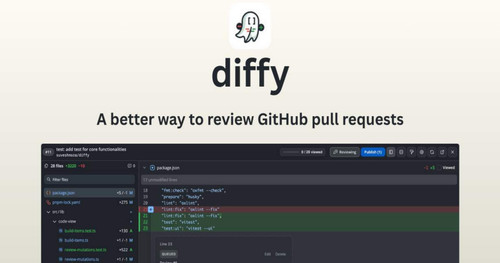
diffy enhances GitHub pull request reviews with features like full-screen diffs, a searchable file tree, and inline comments. Offering a lightweight and smooth user experience, it supports 100+ languages and 50+ themes, making PR reviews more efficient and comprehensive.
diffy is an innovative browser extension designed to enhance the GitHub pull request review experience. With features that prioritize efficiency and clarity, diffy transforms the traditional code review process into a more streamlined, engaging task.
Key Features
- One-click Access: Easily access pull requests with a dedicated View Diff button that starts fetching data as soon as the page loads.
- Full-Screen Diffs: Enjoy a continuous scrolling view of the entire pull request, making navigation easier and more fluid.
- High Performance: Offers a fast and responsive review experience while being lightweight, at under 2 MB.
- Searchable File Tree: Navigate large pull requests seamlessly with a searchable file tree that highlights threads in files.
- Flexible Layout Options: Choose between split and unified views for optimal comparisons.
- Syntax Highlighting: Supports over 100 programming languages with clear, color-coded diffs to enhance readability.
- Customizable Themes: Select from more than 50 themes, including light, dark, and auto modes, to suit user preferences.
- Batch Review Capability: Allows for the collection of multiple comments into a single batch review, simplifying feedback submission.
Why Choose diffy?
GitHub's traditional Files changed tab may struggle with larger pull requests, causing limitations and a frustrating user experience. diffy addresses these issues by:
- Circumventing rendering limits by utilizing the GitHub API to display changes.
- Efficiently handling extensive files and large PRs, providing a continuous view without manual loading.
- Reducing UI lag and improving performance when reviewing medium to large pull requests.
How It Works
- Open a pull request on GitHub and click View Diff to engage the diffy viewer. or right-click any PR link and choose Open in diffy from the context menu.
- Review all changes in one comprehensive, scrollable view.
- Utilize the file tree for easy navigation and searching of modified files.
- Leave comments directly on the diff view to keep feedback contextual.
- Use batch review features for efficient comment management.
By providing essential tools for more structured and focused code reviews, diffy is an invaluable asset for developers seeking a better way to navigate GitHub pull requests.
Comments
0Start the conversation
Share the first comment.