Loading page…
Pitch
Description
Comments

Automating translation file management for seamless internationalization.
Project details
ʻŌlelo Honua simplifies the process of managing and translating locale files, automating creation and synchronization with various translation providers. This library effectively addresses the common challenges of internationalization, ensuring accurate translations while saving time and reducing manual errors. Enhance your application's language support effortlessly.
(ʻŌlelo Honua can be translated to mean "World Language" or "Language Bridge" in Hawaiian.)
Struggling to keep up with the demands of managing translation files for your multilingual app? Tools like i18next or react-i18next often leave you stuck in manual workflows, relying on services like Google Translate or ChatGPT to fill the gaps. It’s tedious, time-consuming, and easy to make mistakes.
That’s where ʻŌlelo Honua comes in. This tool takes the hassle out of internationalization (i18n) by automating translation file creation and updates. Beyond just saving time, it ensures your translations are accurate, culturally appropriate, and free from common errors.
Why waste time on repetitive tasks when you can streamline your i18n process with a tool built to simplify localization? Let ʻŌlelo Honua handle the hard parts so you can focus on delivering great experiences for your global users.
Imagine building an app that speaks to the world. You start with one language, but as your app grows, so does the demand for multilingual support. Manually crafting and updating translation files for every new language? It’s a grind—tedious, error-prone, and a major time sink. Sound familiar?
Say goodbye to the headaches of managing translation files! ʻŌlelo Honua takes the grunt work out of internationalization by automating the creation and synchronization of translation files. With support for trusted providers like Google Translate, it ensures your translations are not only accurate but also always up-to-date. Save time, eliminate errors, and focus on what truly matters—building a world-class multilingual app.
Here's a simple illustration:
This automation makes it easier to manage internationalization in your application, allowing you to focus on other stuff!
For more details about my approach, vision, and methodology, refer to About ʻŌlelo Honua.
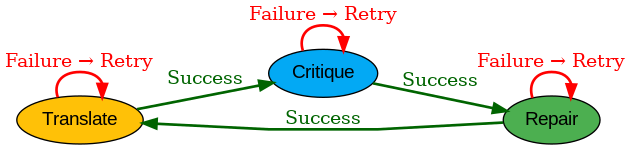
Critiques are a way to evaluate and improve the quality of translations by identifying areas where they may lack clarity, cultural accuracy, or grammatical correctness. ʻŌlelo Honua provides an optional feature to generate AI-powered critiques for translations, helping you refine and enhance your localization efforts.
An example of an AI-generated critique can be seen here.
To install the library, use npm or yarn:
npm install olelo-honua
or
yarn add olelo-honua
Here's how you use the library:
const { OleloHonua, DeepSeekProvider } = require("olelo-honua");

// Create a new instance
const dakine = new OleloHonua(
  {
    primeLanguage: "haw",
    excludeLanguage: ["ja", "en", "de"],
    critique: true,
    repair: true,
  },
  new DeepSeekProvider({ apiKey: '<your_openrouter_api_key>' }), // Highly recommend DeepSeekProvider since it's free & reliable
);
// Runs or re-runs i18n translations
dakine.hanaHou(); // or use alias dakine.createLocaleFiles()
I highly recommend setting up an OpenRouter API Key for use with various models.
How to set up OpenRouter API Key
For better security and ease of configuration, you can store your API key in a .env file. Simply create a .env file in your project root and add the following line:
OPENROUTER_API_KEY=<your_openrouter_api_key>
Then, use a library like dotenv to load the key into your application:
require('dotenv').config();
const apiKey = process.env.OPENROUTER_API_KEY;
This approach keeps your sensitive information out of your codebase and makes it easier to manage across different environments.
You need to provide a configuration object and a translation provider. For instance, you can use the DeepSeekProvider as demonstrated in the usage example. I highly recommend DeepSeek & OpenRouter as these are free and extremely stable. Happy coding!
Here is an example of full configuration options:
const config: LocaleConfig = {
  primeLanguage: "en",
  includeLanguage: ["haw", "ar", "es", "fr"], // Specify languages to include
  // Alternatively, you can use excludeLanguage: ["ja"] to exclude specific languages
  bulkTranslate: true, // Use bulk translation for better performance (replaces useBulkProvider, which is being deprecated)
  critique: true, // Enable AI critique for translations
  saveCritique: false, // Optionally save critiques for further analysis
  repair: false, // Enable or disable automatic repair of translations
  debug: false, // Enable debug mode for detailed logs
  multiLanguageAgreementThreshold: 0.8, // Set threshold for multi-language agreement
  loopRetryOptions: {
    mainLoopRetries: 3, // Number of retries for the main loop
    critiqueLoopRetries: 2, // Number of retries for critique loop
    repairLoopRetries: 1, // Number of retries for repair loop
  },
};
ʻŌlelo Honua supports a variety of translation providers, each tailored to specific use cases:
Note: Free models, such as OpenRouterProvider, come with a token limit. Ensure your usage stays within the allowed quota to avoid interruptions.
Select the provider that aligns with your application's specific needs (and performance requirements) 🌟.
Translations are cached to keep things running smoothly and to cut down on API calls to translation providers. This is super handy if you're using free or limited-tier services with strict quotas. By saving translations locally, you avoid hitting those limits and keep performance steady. If you ever need to clear the cache, just run this command:
rm -rf .translations_cache.json
In addition to Hawaiian 🌺, ʻŌlelo Honua supports a wide range of languages:
We’re committed to fostering a welcoming and inclusive community. You can read our Code of Conduct here.
This project is licensed under the MIT License.

Comments
0Start the conversation
Share the first comment.